









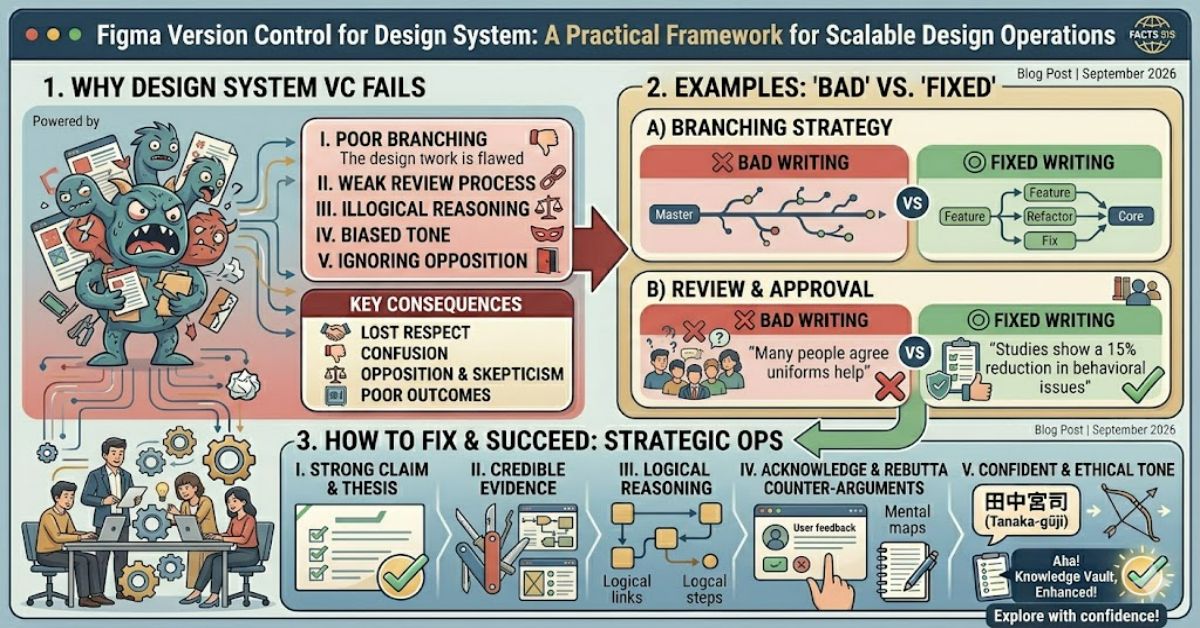
A strong approach to figma version control for design system management allows teams to evolve products without introducing chaos into their design libraries. As organisations scale, designers, developers, product managers, and stakeholders all depend on shared components remaining stable and predictable.
Unlike software development, where Git has become the standard for tracking code changes, design workflows operate differently. Figma does not provide native Git integration for design files. Instead, it offers tools such as Branching, Version History, Library Publishing, and Team Libraries to support controlled collaboration.
The challenge is balancing exploration with stability. Designers need freedom to experiment while ensuring production-ready components remain dependable. This tension becomes even more important when a design system supports multiple products, platforms, or international teams.
The most successful organisations treat design system governance as an operational discipline rather than a purely creative exercise. They establish clear ownership, review processes, and publishing standards that allow innovation without compromising consistency.
This guide explains how version control works inside Figma, where it falls short, and how mature teams create scalable workflows that support both speed and reliability.
Why Design Systems Need Version Control
A design system is far more than a collection of buttons and colours. It acts as a shared language between design and engineering teams.
Without version control, several problems emerge:
- Components become duplicated.
- Documentation becomes outdated.
- Teams create conflicting design patterns.
- Developers implement obsolete specifications.
- Product experiences become inconsistent.
As systems grow, these issues multiply rapidly.
Consider a company maintaining five product lines with twenty designers. A small change to typography or spacing may affect hundreds of components and thousands of screens. Without structured change management, even minor updates can introduce significant operational risk.
Understanding Figma’s Native Version Control Features
When discussing figma version control for design system workflows, most teams rely on four core capabilities.
Comparison Table: Figma Version Control Features
| Feature | Purpose | Best Use Case | Limitation |
| Version History | Records file snapshots | Rollbacks and audits | Limited comparison visibility |
| Branching | Isolates experimental work | Major design updates | Enterprise plans required |
| Library Publishing | Distributes approved components | Production systems | Requires governance |
| Team Libraries | Shares assets across projects | Organisation-wide consistency | Can become cluttered |
Together, these tools create a framework similar to software version control without requiring Git-style repositories.
Branching: The Closest Equivalent to Git
Branching is arguably the most important capability for large-scale design systems.
A branch creates an isolated workspace where designers can:
- Test component changes
- Explore new patterns
- Conduct redesign initiatives
- Review proposals before publication
Once work is validated, branches can be merged back into the main file.
Practical Example
Imagine a team redesigning navigation patterns across a SaaS platform.
Instead of modifying production components directly, they create a branch and:
- Update navigation structures.
- Test multiple variants.
- Conduct usability reviews.
- Secure stakeholder approval.
- Merge approved changes.
This prevents unfinished work from affecting the entire organisation.
The Hidden Risk of Overusing Branches
One overlooked challenge is branch sprawl.
Many articles praise branching but rarely discuss its operational cost.
When dozens of branches remain open:
- Merge conflicts increase.
- Component relationships become unclear.
- Designers lose confidence in system status.
- Reviews become difficult.
Original Insight #1
The biggest version-control problem in mature design systems is not insufficient branching—it’s excessive branching without governance.
Teams should establish:
- Branch ownership
- Review deadlines
- Merge schedules
- Archive policies
Branches should support decision-making, not become permanent workspaces.
Version History as a Governance Tool
Many teams use Version History only for recovery purposes.
That is a mistake.
Version History also provides accountability.
When major updates occur, organisations can:
- Document rationale
- Track approvals
- Review previous patterns
- Understand change timelines
This creates an audit trail that becomes increasingly valuable as design systems mature.
Source of Truth Versus Sandbox Environments
A common mistake in figma version control for design system implementation is mixing experimental work with production assets.
Successful teams separate environments into:
Stable Library
Contains:
- Approved components
- Published documentation
- Production tokens
- Developer-ready assets
Exploration Workspace
Contains:
- Concept designs
- Early experiments
- Research prototypes
- Unvalidated components
This separation dramatically reduces accidental publishing and user confusion.
Structured Insight Table: Design System Maturity Levels
| Maturity Level | Characteristics | Version Control Approach |
| Beginner | Shared files with minimal governance | Manual version naming |
| Developing | Published libraries and documentation | Version History usage |
| Advanced | Branching workflows and approvals | Controlled publishing |
| Enterprise | Cross-team governance models | Formal release management |
The maturity of version control often reflects the maturity of the organisation itself.
Strategic Implications for Product Teams
Design systems increasingly function as operational infrastructure.
Changes made within design libraries affect:
- Product development timelines
- Front-end implementation
- Accessibility compliance
- User experience consistency
- Cross-platform alignment
As a result, version control becomes a business issue rather than simply a design concern.
Original Insight #2
The true cost of poor design-system version control is rarely design rework. It is development inefficiency created by uncertainty around which components are authoritative.
When engineers cannot trust component libraries, they create local workarounds that increase technical debt.
Managing Component Releases Like Software Releases
Leading organisations increasingly treat design system updates as product releases.
This includes:
Release Notes
Document:
- Added components
- Modified behaviours
- Deprecated patterns
- Accessibility updates
Change Logs
Provide transparency regarding:
- What changed
- Why it changed
- Who approved it
Review Cycles
Scheduled governance reviews ensure libraries remain coherent over time.
This process mirrors software release management because both disciplines face similar scalability challenges.
Common Failure Patterns
Several recurring mistakes undermine design-system reliability.
Publishing Too Frequently
Excessive updates create confusion.
Teams struggle to identify stable versions and developers cannot keep pace with changes.
Publishing Too Infrequently
Conversely, delayed releases encourage local modifications that fragment the system.
Weak Ownership
Without designated maintainers, accountability disappears.
Missing Documentation
Components without usage guidance generate inconsistent implementation.
Real-World Observations from Mature Design Teams
Public design-system teams at organisations such as Atlassian, Shopify, and IBM have consistently highlighted governance, documentation, and review processes as critical success factors within their design-system programmes.
A common pattern emerges:
- Design systems succeed when treated as products.
- Dedicated ownership improves consistency.
- Documentation receives continuous maintenance.
- Release management becomes routine.
The tooling matters, but governance matters more.
Risks and Trade-Offs
No version-control strategy is perfect.
Benefits
- Greater consistency
- Improved collaboration
- Reduced duplication
- Better developer alignment
Trade-Offs
- Increased administrative overhead
- Additional review processes
- Slower publication cycles
- Governance complexity
The goal is not maximum control.
The goal is appropriate control.
Original Insight #3: The Documentation Gap Is Often Larger Than the Component Gap
Many organisations focus heavily on component maintenance while neglecting documentation updates.
As a result:
- Components evolve.
- Usage guidance remains outdated.
- Teams misuse otherwise correct assets.
A version-controlled component without version-controlled documentation creates a false sense of system reliability.
Documentation should follow the same review and publishing workflow as components themselves.
The Future of Figma Version Control for Design System in 2027
By 2027, several trends are likely to shape design-system management.
AI-Assisted Governance
Design platforms are increasingly introducing AI-powered workflows that help identify:
- Duplicate components
- Inconsistent naming
- Accessibility issues
- Documentation gaps
Stronger Design-to-Code Synchronisation
The boundary between design assets and implementation code will continue to narrow.
Teams will expect:
- Design tokens
- Component metadata
- Development handoff automation
to remain synchronised across platforms.
Design Operations Expansion
Larger organisations are investing in dedicated DesignOps functions responsible for:
- Governance
- Tooling strategy
- Library maintenance
- Process optimisation
Constraints Remain
Despite technological improvements, human review will remain essential.
No automation can fully replace contextual decision-making around design standards and user experience quality.
Key Takeaways
- Design system version control is fundamentally about trust and governance.
- Figma Branching supports experimentation while protecting production assets.
- Version History should be used as both a recovery and accountability mechanism.
- Excessive branching creates operational complexity if left unmanaged.
- Documentation must evolve alongside components.
- Design-system ownership is often a stronger predictor of success than tooling choice.
- Future workflows will increasingly connect design governance with engineering systems.
Conclusion
Managing figma version control for design system workflows requires far more than understanding software features. The real challenge lies in creating operational processes that allow experimentation while preserving stability.
Figma provides a capable foundation through Branching, Version History, Library Publishing, and shared libraries. Yet tools alone cannot solve governance problems. Teams need clear ownership, documented review processes, publication standards, and accountability mechanisms.
The most effective design systems behave like products. They have maintainers, release cycles, change logs, and documentation strategies. This structure enables designers to innovate confidently while ensuring developers and stakeholders can trust the system’s outputs.
As organisations expand their digital ecosystems, version control will become increasingly central to design operations. Teams that establish disciplined practices today will be better positioned to scale tomorrow without sacrificing consistency, efficiency, or user experience quality.
FAQ
What is Figma version control for design systems?
It refers to the processes and tools used to track, manage, review, and publish design-system changes within Figma. Common tools include Branching, Version History, and Library Publishing.
Does Figma work like Git?
Not exactly. Figma does not provide native Git-style repositories. Instead, it offers design-focused collaboration features such as branching and file history to manage changes.
When should a design team use branching?
Branching is most useful for significant updates, redesign projects, component overhauls, or experiments that should not affect production libraries.
Can small teams benefit from design-system version control?
Yes. Even teams of two or three designers benefit from structured workflows because they reduce confusion and improve consistency.
What is the biggest risk in design-system governance?
A lack of ownership. Without designated maintainers, components, documentation, and publishing standards often become inconsistent.
How often should design libraries be updated?
Most mature teams publish updates on predictable schedules rather than continuously. This helps developers and stakeholders adapt more effectively.
References
- Figma Branching Documentation
- Figma Version History Documentation
- Atlassian Design System
- Shopify Polaris Design System
- IBM Carbon Design System