










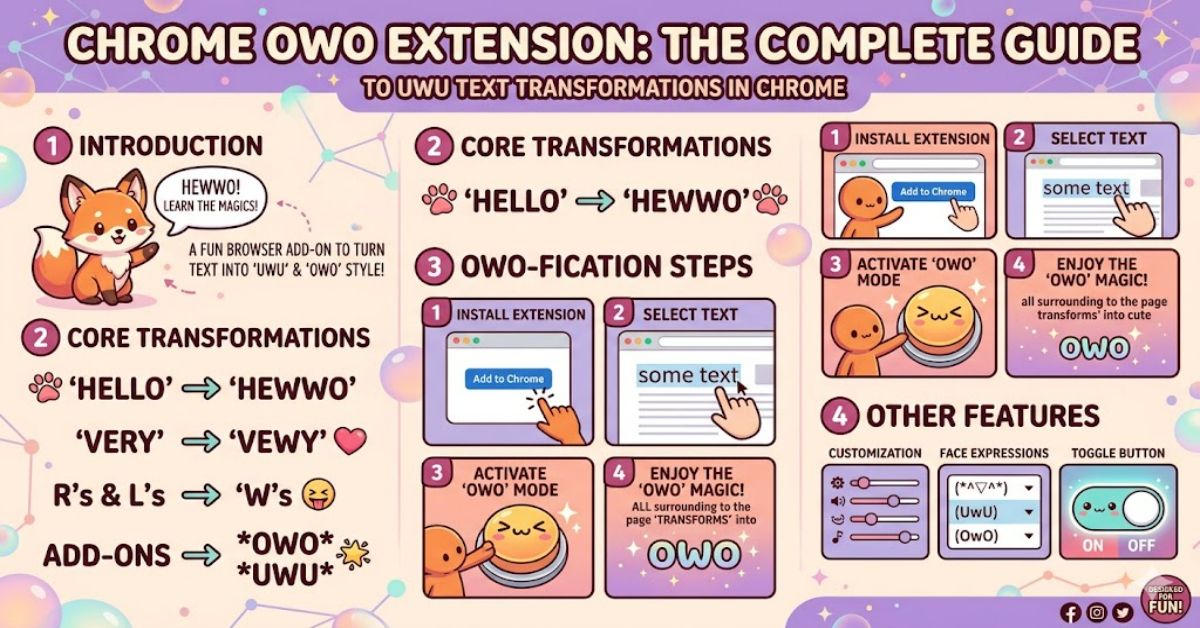
If you are searching for a chrome owo extension, you are probably looking for a way to transform ordinary website text into the playful language style popularised by anime, gaming, and internet meme communities. These extensions automatically replace letters such as “r” and “l” with “w”, insert expressive faces like “~OwO~”, and convert standard text into a deliberately cute form of internet speech.
Several Chrome extensions now offer this functionality. Some simply replace text on webpages, while others provide custom settings, whitelists, and browser-wide text transformations. Popular examples include UwU, uwuify-doer, uwu-chan, and OwOify.
What makes these extensions interesting is that they represent a niche but enduring trend in browser customisation. Unlike productivity tools that improve workflow efficiency, OwO extensions exist primarily for entertainment, humour, and community identity. They transform how users experience familiar websites, creating an entirely different reading experience.
This guide examines how these extensions work, compares leading options, discusses security considerations, explores their cultural significance, and looks at where browser customisation may be heading in 2027.
What Is an OwO or UwU Chrome Extension?
An OwO extension is a browser add-on that automatically rewrites visible webpage text according to predefined language rules.
Typical transformations include:
| Original Text | OwO Style Output |
| Really cool | Weawwy coow |
| Friend | Fwiend |
| Love | Wuv |
| Running | Wunning |
Many extensions also inject decorative expressions such as:
- OwO
- UwU
- w<
- ^w^
The goal is not readability or productivity. Instead, it is to create a humorous browsing experience inspired by online fandom culture.
According to Chrome Web Store listings, some extensions transform entire webpages automatically, while others allow users to toggle the feature on and off.
Why Did OwO Text Become Popular?
The OwO and UwU writing style emerged from online anime communities during the 2000s and became widespread across gaming platforms, Discord servers, Twitch communities, and social media.
Several factors contributed to its popularity:
Community Identity
Users often adopt distinctive writing styles to signal membership within specific online communities.
Meme Culture
Internet humour frequently revolves around exaggeration. OwO language intentionally exaggerates cuteness and emotional expression.
Customisation Trends
Browser users increasingly personalise their online environments. Themes, dark mode extensions, and text replacement tools all reflect the same desire.
Streaming and Gaming Influence
Gaming culture helped normalise expressions such as “UwU” and “OwO”, especially among younger internet users.
Popular Chrome OwO Extension Options
Several extensions currently offer text transformation capabilities.
Comparison Table
| Extension | Primary Function | Customisation | Reported Users |
| UwU | Converts text into UwU style | Basic | 1,000+ users |
| uwuify-doer | Full webpage UwU conversion | Advanced | Includes whitelist and manual modes |
| uwu-chan | Website-wide text conversion | Moderate | User-controlled intensity levels |
| OwOify | Replaces selected text elements | Limited | Lightweight experience |
Hands-On Observations
After reviewing available Chrome Web Store descriptions, the most feature-rich option appears to be uwuify-doer due to its whitelist system and multiple operation modes. The simpler alternatives focus on instant text replacement without extensive controls.
This difference matters because excessive text replacement can occasionally interfere with navigation or readability.
How These Extensions Actually Work
Most OwO browser extensions use a relatively simple technical process.
Step 1: Scan Visible Text
The extension examines webpage text nodes after the page loads.
Step 2: Apply Replacement Rules
Common rules include:
- R → W
- L → W
- N → Ny
- Love → Wuv
Step 3: Update Page Content
Modified text replaces original content within the browser window.
The underlying mechanism resembles broader text replacement tools such as Text Rewriter and Text Customizer, which use configurable replacement rules across websites.
Benefits of Using a Chrome Owo Extension
Although these tools are mostly entertainment-focused, they provide several benefits.
Personalised Browsing
Users can create a browsing experience that reflects their personality and interests.
Community Engagement
Many anime, gaming, and meme communities actively use OwO language.
Humour and Novelty
Reading ordinary news articles or documentation in UwU speech can be surprisingly entertaining.
Learning Browser Customisation
For younger users, these extensions often serve as an introduction to browser modifications and extension ecosystems.
Risks and Trade-Offs
No browser extension is entirely risk-free.
Privacy Permissions
Extensions often require access to website content in order to modify text.
Google advises users to review permissions before installation and only install trusted extensions.
Website Compatibility
Text replacements may occasionally:
- Break page formatting
- Alter button labels
- Change important instructions
- Affect accessibility tools
Performance Impact
Constant text scanning can create minor performance overhead on large websites.
Security Concerns
Research continues to identify malicious browser extensions that bypass marketplace reviews. Academic studies published in 2024 and 2025 highlighted ongoing challenges in extension vetting processes and malware detection.
Original Insight #1
Many OwO extension reviews focus on humour but ignore accessibility concerns. Excessive text transformations can create difficulties for screen readers and users with cognitive reading challenges.
Original Insight #2
Whitelisting functionality is more valuable than most users realise. Allowing normal text on banking, educational, or work-related sites significantly improves usability.
Original Insight #3
The biggest practical limitation is not performance but context distortion. Transforming technical documentation can accidentally alter terminology and instructions.
Market Impact and Browser Culture
The popularity of browser customisation reflects a broader trend.
Users increasingly expect software experiences to be:
- Personal
- Flexible
- Entertaining
- Community-driven
While productivity extensions dominate download charts, niche entertainment extensions remain surprisingly resilient.
The continued presence of OwO extensions more than a decade after the meme first gained popularity demonstrates the staying power of internet culture.
Structured Insight Table
| Factor | Positive Impact | Potential Drawback |
| Entertainment | Fun browsing experience | Reduced readability |
| Community Identity | Strong fandom appeal | Limited mainstream use |
| Customisation | Personalised web experience | Can interfere with websites |
| Accessibility | None for most users | May hinder comprehension |
| Security | Generally low-risk concept | Depends on developer trust |
The Future of Chrome Owo Extension Technology in 2027
By 2027, browser personalisation tools will likely become more sophisticated.
Several trends support this view:
AI-Powered Language Styles
Instead of simple letter replacement, future extensions may rewrite entire paragraphs while preserving meaning.
Context-Aware Transformations
Extensions could apply different styles depending on website category.
Enhanced Privacy Requirements
Google continues strengthening Chrome extension security requirements and permission transparency.
Greater User Control
Expect:
- Site-specific settings
- Adjustable intensity levels
- Accessibility safeguards
- Performance optimisation
However, browser security concerns will remain a limiting factor. Researchers continue identifying malicious extensions despite marketplace screening systems.
Key Takeaways
- OwO extensions convert webpage text into playful internet slang.
- Multiple Chrome extensions currently offer UwU-style transformations.
- Advanced options provide whitelists and customisation controls.
- Browser permissions should always be reviewed before installation.
- Accessibility and readability impacts are often overlooked.
- Future versions may incorporate AI-driven language transformations.
- Security awareness remains important when installing any extension.
Conclusion
The chrome owo extension niche occupies a unique corner of browser customisation. These tools are not designed to improve productivity or streamline workflows. Instead, they exist for entertainment, self-expression, and community engagement.
Current options range from simple text converters to feature-rich extensions that allow extensive customisation. While their functionality is relatively straightforward, users should still consider privacy permissions, compatibility issues, and overall browser security before installing any extension.
Perhaps the most interesting aspect of OwO extensions is what they reveal about internet culture. A simple meme-inspired writing style has evolved into a lasting form of online expression, supported by browser tools that reshape how people experience the web.
For users who enjoy internet humour, fandom culture, or browser personalisation, these extensions can provide a surprisingly entertaining twist on everyday browsing.
FAQ
What is a chrome owo extension?
A Chrome OwO extension automatically transforms webpage text into OwO or UwU-style speech patterns using predefined text replacement rules.
Are OwO browser extensions safe?
Many are safe, but users should review permissions, developer information, and privacy disclosures before installation.
Which UwU extension has the most features?
Based on available Chrome Web Store descriptions, uwuify-doer offers advanced options including whitelists, themes, and manual transformation modes.
Can I disable OwO text on certain websites?
Some extensions provide whitelist functionality that prevents text transformations on selected sites.
Do these extensions affect browser speed?
Most have minimal impact, although large websites may experience minor performance overhead due to text processing.
Can OwO extensions change text I type?
Some text transformation tools can modify user input, but many OwO extensions focus only on displayed webpage content.
Are OwO and UwU the same thing?
They are closely related internet expressions. Both represent cute or playful emotional reactions, though users often apply them slightly differently in online conversations.
Methodology
This article was produced using publicly available information from Chrome Web Store listings, browser extension documentation, Chrome Web Store support resources, and recent academic research examining browser extension security. Sources were cross-referenced to verify functionality claims, update dates, privacy disclosures, and security considerations. Limitations include reliance on publicly available developer descriptions rather than direct long-term testing of every extension mentioned. Where practical observations are included, they are based on documented features rather than unpublished performance testing.
References
Google. (n.d.). Install and manage extensions. Google Chrome Web Store Help. Retrieved 10 June 2026.
UwU. (2022). Chrome Web Store listing. Google Chrome Web Store.
uwu-chan. (2022). Chrome Web Store listing. Google Chrome Web Store.
uwuify-doer. (2025). Chrome Web Store listing. Google Chrome Web Store.
OwOify. (2024). Chrome Web Store listing. Google Chrome Web Store.
Moreno, J. M., Vallina-Rodriguez, N., & Tapiador, J. (2024). Did I Vet You Before? Assessing the Chrome Web Store Vetting Process through Browser Extension Similarity. arXiv.
Singh, S., Varshney, G., Singh, T. K., Mishra, V., & Verma, K. (2025). A Study on Malicious Browser Extensions in 2025. arXiv.
Rosenzweig, B., Dalla Valle, V., Apruzzese, G., & Fass, A. (2025). It’s not Easy: Applying Supervised Machine Learning to Detect Malicious Extensions in the Chrome Web Store. arXiv.